How to Read the Dow Jones Industrial Average? From Index Meaning to Market Data Integration, Start by Clarifying the Data Scope
TickDB Research ·
How to Read the Dow Jones Industrial Average? From Index Meaning to Market Data Integration, Start by Clarifying the Data Scope
When searching for the Dow Jones Industrial Average, how do you confirm what the number represents and how recently it was updated? Start by distinguishing between the index value, related futures, and ETFs, then verify the data timestamp and percentage change basis. The Dow uses price weighting; TickDB documentation and this product query mark DJI as an index, so the market dashboard should display data according to its index identity and field scope, not directly reuse stock quote components.

Understand the Dow First, Then Check Today's Move
The Dow Jones Industrial Average, abbreviated as DJIA or "the Dow," measures the stock performance of 30 US blue-chip companies. It uses price weighting rather than assigning weights based on market capitalization. The word "Industrial" in the name doesn't mean the constituents are limited to manufacturing companies.
Two key distinctions help in understanding it: the index value is a metric calculated according to its methodology; the price of a single stock is the trading quote for that security. When the Dow rises, it means the calculated metric for this sample has increased according to the established rules—not that all US stocks have risen.
Price weighting can be simply understood as: the sum of constituent prices divided by an adjusted index divisor. This divisor is not a fixed 30; events like stock splits require corresponding adjustments to maintain index continuity. Actual maintenance should follow the index provider's methodology documents.
Here's a purely illustrative example to understand weighting: Suppose two constituents are priced at $100 and $400 respectively, and both rise by 1%. The corresponding price increments are $1 and $4. Assuming the divisor remains unchanged and other conditions are equal, the latter stock contributes four times as much to the index point change as the former. If both stocks rise by $1, their contributions are equal.
This is also why looking at "how many constituents rose" alone is insufficient to explain how much the Dow moved. As a market overview, it represents one perspective and shouldn't be treated as a complete picture of the entire US market.
All Pages Show "Dow," Yet Numbers Differ—Why?
Checking the quote object first is often more effective than immediately comparing two numbers.
| Object Shown | What the Number Represents | What to Verify Before Comparing |
|---|---|---|
| Dow Jones Industrial Average | Index value calculated per methodology | Index version, data timestamp, whether delayed |
| Dow-related futures | Market quote for specific futures contract | Exchange, expiration month, whether continuous contract |
| ETF tracking the Dow | Trading price of fund shares | Fund ticker, currency, trading session |
For example, CME's E-mini Dow uses YM as its product code; actual integration still requires identifying the specific contract. DIA is an ETF tracking the Dow, and its per-share price cannot be directly used as the index value. They are related to the Dow, but are not three interchangeable data streams.
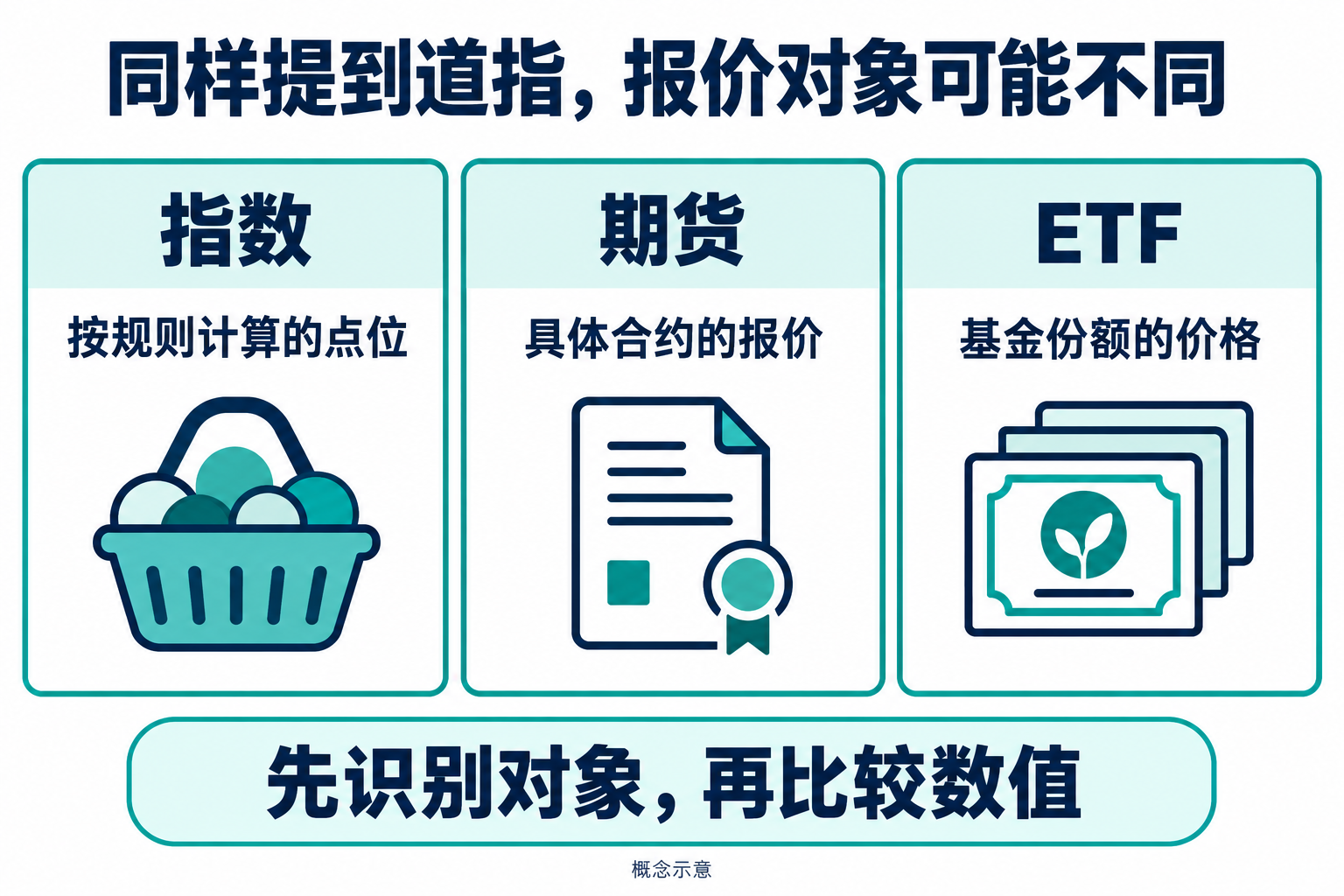
Figure 1: Identify the quote object first, then compare values. Diagrams do not represent actual market data or indicate that the data source covers all related products.
Even when both pages display the index, continue verifying: Is it showing a price index or a total return series that reinvests dividends? Does one show the previous close while the other shows a later snapshot? Is the page refresh time the same as the market data timestamp?
"The website just refreshed" only indicates the page was updated—it cannot alone prove the quote was just generated. The same applies to integration: a successful API request doesn't mean the data meets your business's timeliness requirements.
What Should a Minimal Dow Dashboard Display?
A useful minimal dashboard should at least include name and ticker, index value, data timestamp, and percentage change with a reliable basis. Data source and latency information should also be findable by users.
Here are three implementation details that are easy to overlook.
First, include a timestamp next to the value. Store the data timestamp returned by the API, and separately record the local receive time. The difference between them can only be used to observe data age—it cannot be claimed as provider network latency without verification. The page can display Beijing time or New York time, but the timezone must be explicit; New York time should handle daylight saving through a timezone library.
Second, percentage change must have the same-caliber basis. Daily percentage change typically uses the previous session's close as the basis:
Percentage change = (Current value ÷ Previous close − 1) × 100%.
If the previous close is missing, display "—" or "basis unavailable"—don't default to zero, and don't treat the last received quote as the previous close. When switching trading sessions, don't continue using an unconfirmed old basis.
Third, don't copy a stock order book for an index. General market data APIs may include bid price, ask price, or volume fields, but the index itself is not a security that can be directly traded. The relevant fields in this DJI query sample show zero values; the article examples do not interpret these as "you can buy the Dow at $0" or "the entire market has no trading volume," but only display the fields needed for this task.
If historical charts are added later, also verify: same underlying, same index version, same candlestick period, and same timezone. Mixing historical price series with dividend-inclusive return series will make retrospective analysis incomparable.
When Using TickDB for Integration, Confirm DJI's Identity First
TickDB serves as the market data input here. The verification date is October 20, 2026: the official market snapshot documentation lists a DJI index example; this product catalog query returns the name Dow Jones Industrial Average, type indices, and the market query returns the same identity.
This result supports using DJI as the index snapshot example for this article, but does not prove all accounts have the same permissions, nor does it constitute measured conclusions about tick-by-tick latency or continuous stability. Before launch, also confirm account entitlements, data timeliness, and display licensing.
The call chain can remain simple: server reads API key, fetches DJI snapshot; adapter layer checks business status, instrument identity, and required fields; frontend receives processed value, timestamp, and status. The key stays in server environment variables and is not put into public frontend code.
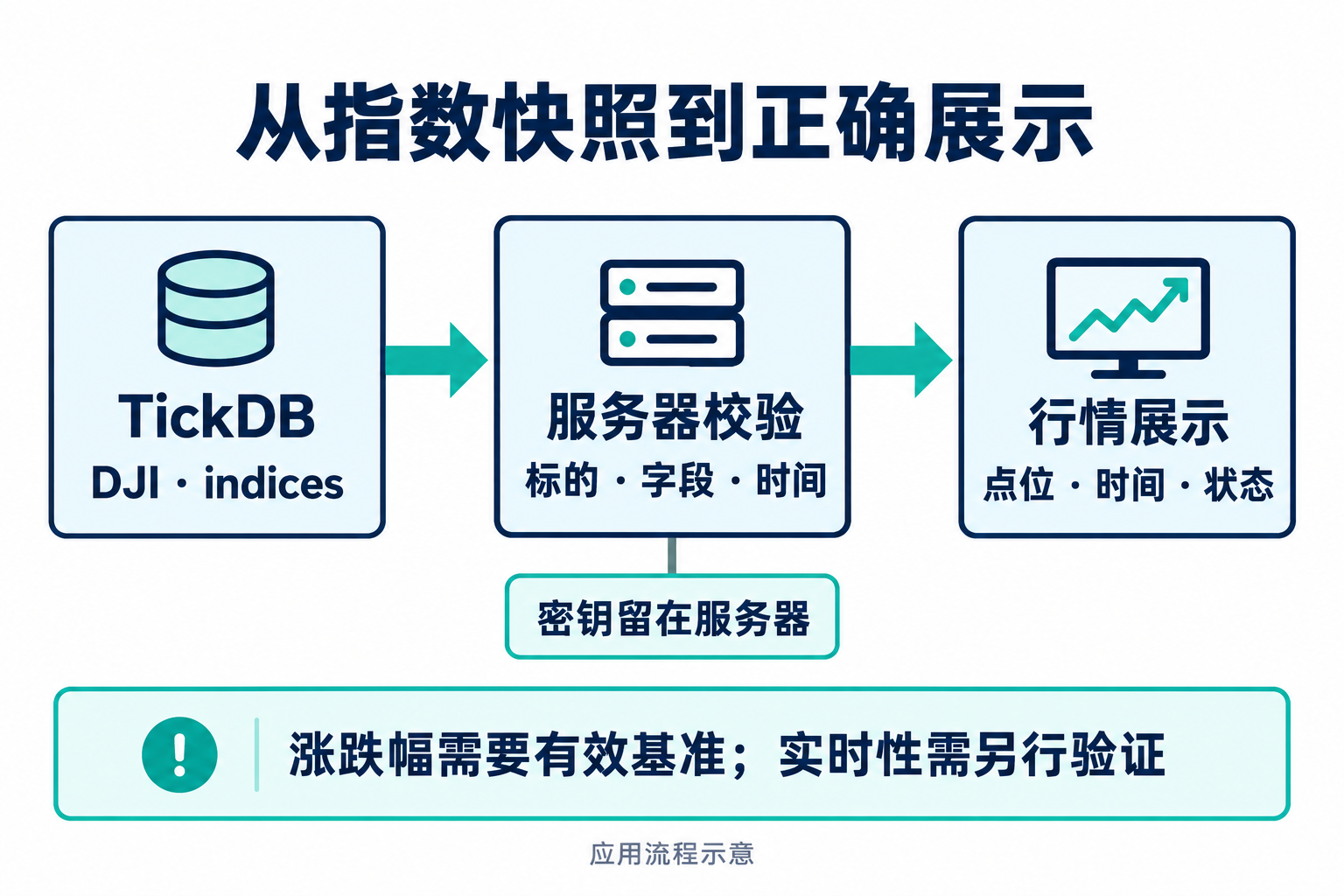
Figure 2: Application flow from index snapshot to display. Validation and display logic are implemented by the application; the diagram makes no commitment to specific latency.
Current documentation lists symbol, last_price, and timestamp as base return fields, where timestamp uses Unix milliseconds; statistical fields like prev_close are returned based on data availability. The example therefore allows prev_close to be absent and does not automatically interpret "24h" in field names as rolling 24-hour scope.
The Python example below uses the standard library, fetches one snapshot, and outputs the minimal dashboard results. First, set TICKDB_API_KEY in your runtime environment; code requires Python 3.9 or later. API and fields have been verified against documentation, and parsing logic has been validated using saved responses and constructed samples; this script has not undergone user key REST direct connection or intraday continuous operation verification.
import json
import os
from datetime import datetime, timezone
from decimal import Decimal
from urllib.request import Request, urlopen


def make_view(body):
    if str(body.get("code")) != "0":
        raise ValueError("API business error")
    rows = body.get("data")
    if not isinstance(rows, list):
        raise ValueError("Invalid data")
    rows = [r for r in rows
            if isinstance(r, dict) and r.get("symbol") == "DJI"]
    if len(rows) != 1:
        raise ValueError("Missing or duplicate DJI")
    row = rows[0]
    if row.get("type") not in (None, "indices"):
        raise ValueError("Unexpected product type")
    value = Decimal(str(row["last_price"]))
    if not value.is_finite() or value <= 0:
        raise ValueError("Invalid index value")
    ts = row["timestamp"]
    if type(ts) is not int or ts <= 0:
        raise ValueError("Invalid timestamp")
    data_time = datetime.fromtimestamp(ts / 1000, timezone.utc)
    prev = row.get("prev_close")
    change = None
    if prev not in (None, ""):
        prev = Decimal(str(prev))
        if prev.is_finite() and prev > 0:
            change = (value / prev - 1) * 100
    return {
        "symbol": "DJI",
        "index_points": str(value),
        "data_time_utc": data_time.isoformat(),
        "change_pct_from_prev_close":
            None if change is None else f"{change:.2f}",
        "freshness": "not_evaluated",
    }


if __name__ == "__main__":
    url = ("https://api.tickdb.ai/v1/market/ticker"
           "?symbols=DJI&type=indices")
    request = Request(url, headers={
        "X-API-Key": os.environ["TICKDB_API_KEY"]
    })
    with urlopen(request, timeout=10) as response:
        body = json.load(response)
    print(json.dumps(make_view(body), ensure_ascii=False, indent=2))
This code deliberately does not mark a successful response as "real-time." The initial value for freshness is not_evaluated, indicating that evaluation against trading calendar and business timeliness requirements has not yet been performed; it also does not assume market closure just because data hasn't updated.
The output name for percentage change emphasizes "calculated from returned prev_close." Before labeling it as the page's "Today's Change," also confirm which trading session that reference value corresponds to. Fields directly provided by the API for price change should also be independently verified; if the calculated value differs, investigate the basis, sampling time, and precision—don't silently overwrite.
From "Got the Quote" to "Displaying Correctly"—What Verification Remains?
Checking results across four scenarios is more effective than only seeing one successful request.
- Normal sample: Use teaching data "current value 40,200, previous close 40,000" to verify percentage change is 0.50%; these numbers are constructed inputs, not current market data.
- Previous close absent: Value and timestamp can still display; percentage change outputs as null, and the interface shows "—". Do not display 0.00%.
- Instrument mismatch or API failure: Refuse to display other instruments under a Dow title; when the interface retains the last valid data, also mark the update failure and its original timestamp.
- Data stops updating: Use trading calendar, data source documentation, and business thresholds to distinguish between market closure, delayed data, and anomalies. Timeout thresholds are determined by application requirements—don't write example thresholds as data source commitments.
This verification approach applies whether using TickDB or other sources. A reliable Dow page not only gives the value, but also lets readers know what type of object it is, what timestamp it corresponds to, and what basis the percentage change uses. Only after clearly establishing these relationships can you add trend charts, comparisons, and alerts with a credible data foundation.
Reference materials: S&P Dow Jones Indices Dow Jones Industrial Average and Dow Jones Averages Methodology; CME Group E-mini Dow contract specifications; State Street DIA product information; TickDB Quick Start, Product Query, Market Snapshot. Materials and API verification date: October 20, 2026.