Using a Stock API: Why Quote Displays and Research Exports Need Different Rules
TickDB Research ·
Abstract: For financial product managers building a stock page with a quote display and historical export, connecting the API is only part of the task. This guide explains how snapshots, price bars, and CSV files differ, why a record's timestamp does not establish when its final value was available, and how to turn saved TickDB responses into a timestamped static quote card and a date-filtered research CSV. A runnable Python example makes the output rules inspectable.
Imagine a stock page with a price at the top and a historical-data download underneath. Both features work, yet users still ask: How current is this price? What does the last exported date include? Why does the displayed price differ from the final row? Without clear answers, functioning features can still lead users to interpret the data incorrectly.
Start by separating the inputs. A ticker snapshot supplies the market state returned by a query; historical bars organize observations by period. In this example, saved TickDB ticker and candlestick responses feed a static quote card and a research export for the same security. Each output retains the time and price-basis information its purpose requires.
1. What are snapshots, bars, and research files?
A snapshot describes the returned market state
A price such as 880 is more useful when displayed alongside the security and its data time. A dated observation gives the reader a basis for judging its relevance.
A snapshot can also contain statistics such as opening price, highs, or volume. It is not necessarily a single value, but one snapshot does not automatically supply a complete historical bar series. TickDB's ticker response identifies the security, last traded price, and data timestamp through symbol, last_price, and timestamp. Field definitions and availability conditions are described in the ticker documentation.
A bar summarizes a defined period
A trade-price bar summarizes activity within an interval using values such as open, high, low, and close. A sequence of bars provides a history at that interval.
Before using the series, establish the security, interval, adjustment basis, and period represented by each record. A daily close and a minute close describe different intervals, even when both fields are named close.
A CSV is an application output
CSV describes a file format. Writing one latest-price observation into a CSV does not turn it into historical data. Exporting selected daily bars gives you a table of those selected records.
The format controls storage; the record's meaning controls its use. HTML, JSON, and CSV can carry results, but none defines the price basis or time rules for you.
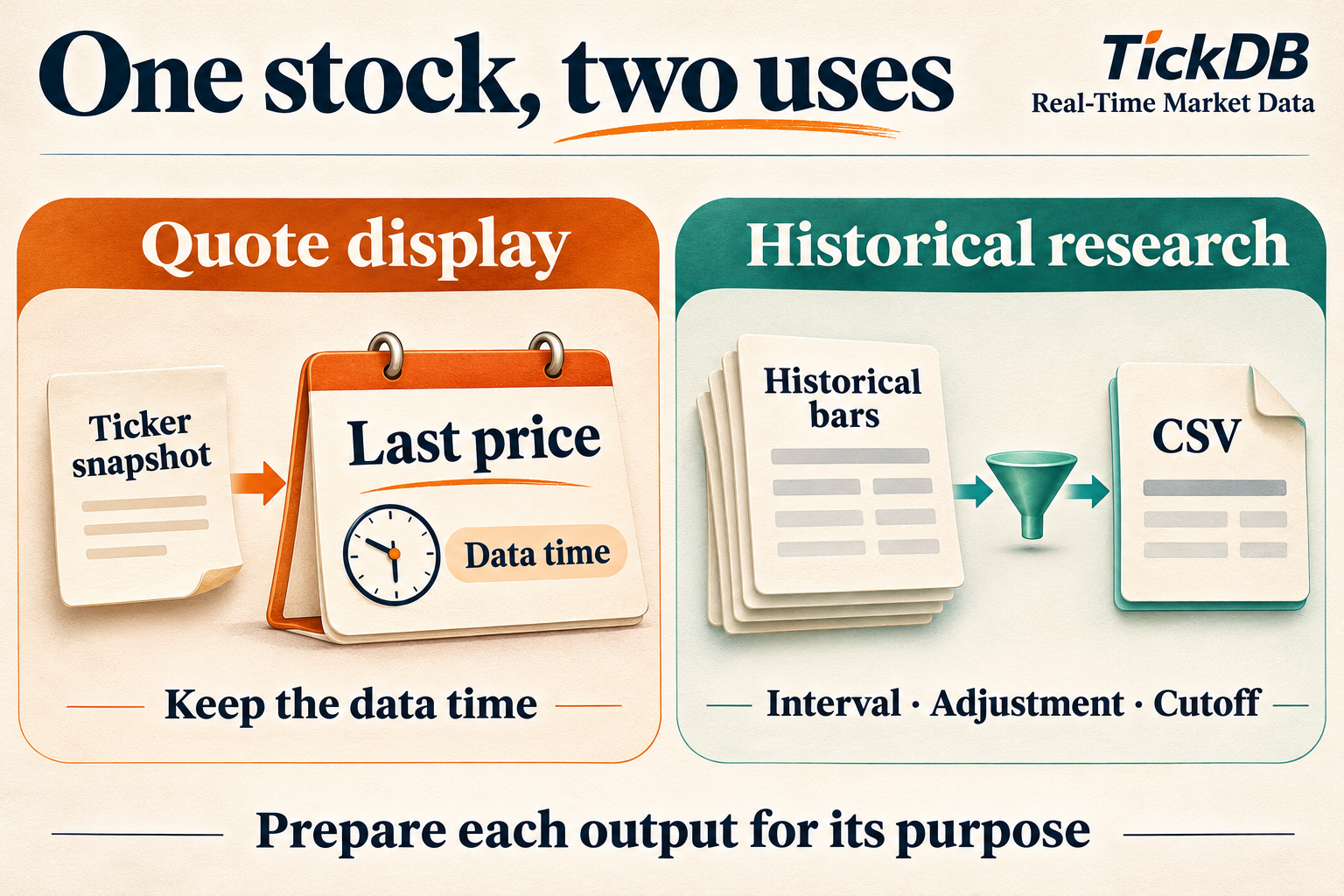
Figure 1. AI-generated explanatory illustration of the two data-use paths. TickDB supplies this example's market-data inputs; application code builds the card and CSV.
2. Why separate them? Equal prices can carry different information
Consider a constructed teaching example, not an observed TickDB market sample. There are only three trades between 10:00:00 and 10:01:00:
| Trade time | Price |
|---|---|
| 10:00:05 | 100 |
| 10:00:20 | 102 |
| 10:00:50 | 101 |
Once the minute ends, the bar has an open of 100, high of 102, low of 100, and close of 101. The last trade price is also 101.
The values match, but the fields answer different questions: the last trade describes a transaction, while the close belongs to a particular interval. Keeping only 101 loses the fact that the price reached 102. Even OHLC values do not preserve the full sequence of trades.
A quote display can use the latest observation with its time. Research across periods requires the appropriate series with a consistent interval and price basis.
3. A period label does not establish when its final value was known
Suppose a program makes a decision at 10:00:30. The 10:00:50 trade has not happened. The most recent trade in the example is 102; the eventual minute close of 101 is not yet known.
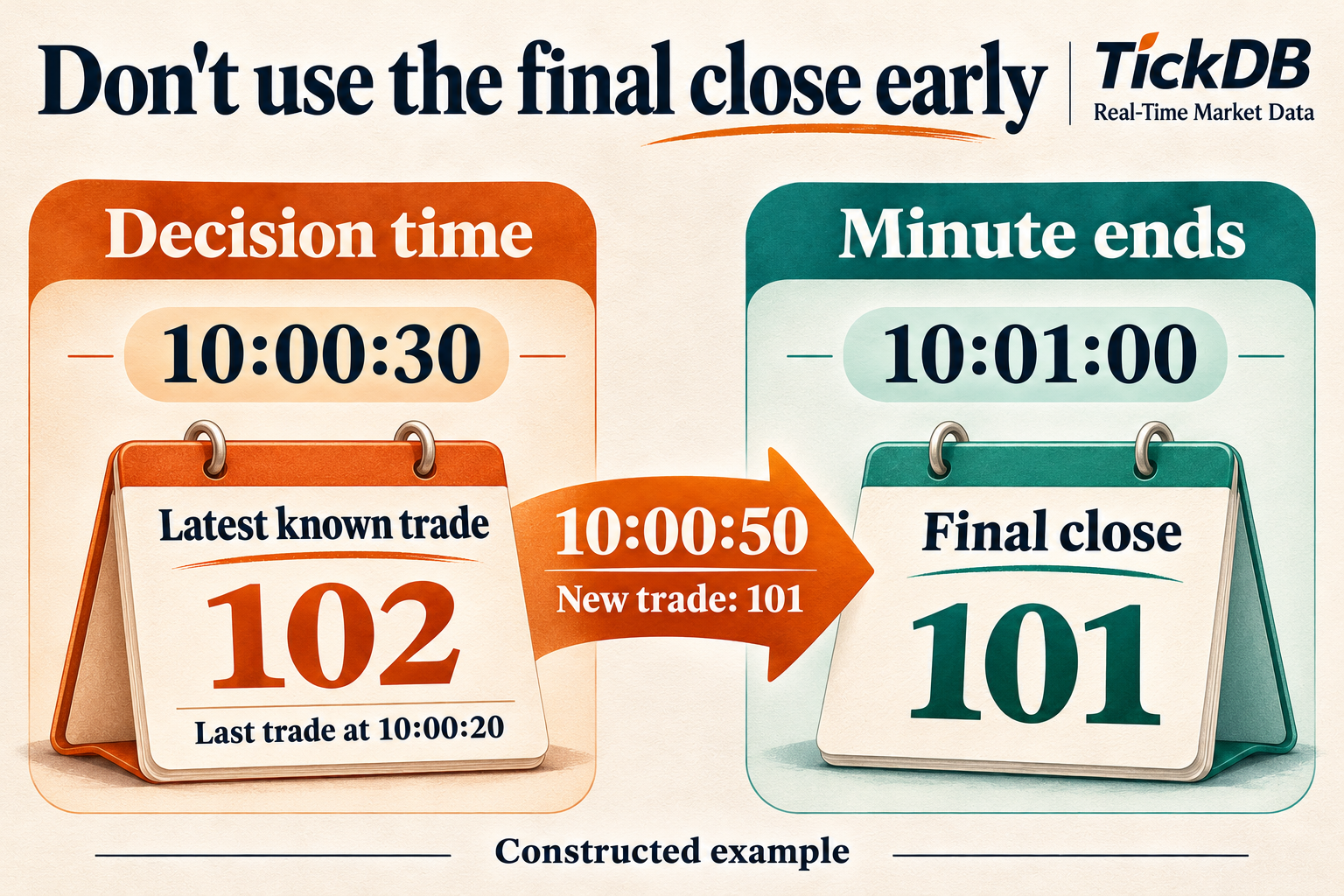
Figure 2. AI-generated illustration of a constructed teaching example, not a TickDB observation. Assume the first two trades were received before the decision; production applications must also account for publication and delivery delays.
A historical bar may be labeled by the start of its interval or another convention. Confirm the definition before using the completed bar's values in a decision at that label time. QuantConnect's documentation illustrates this distinction between a bar's period and its delivery time to help avoid look-ahead errors. This is a modeling principle, not a statement about TickDB's timestamp convention. Time-modeling reference.
Stock research also needs an explicit adjustment basis. Adjustments account for corporate actions when comparing historical prices, and later queries may return revised adjusted history. TickDB notes that the latest bar may still be forming and adjusted history can change after corporate actions or data updates. Candlestick usage notes.
Keep three questions separate: Which date does the record belong to? Has its period finished? Was this data version available at the historical decision time? Filtering by date addresses only the first.
4. Turn those distinctions into output rules
For the stock-page task, write two explicit requirements:
Quote display: show a saved quote for the requested security, with its data time, retrieval date, and update status.
Research export: select records for the requested security, interval, and adjustment basis through an inclusive cutoff, using a stated date convention and recording the actual output range.
The data time identifies the returned observation. The retrieval date records when the input was obtained. The cutoff controls which records the export retains.
For example, a response retrieved on November 1 can contain a quote dated October 30. Labeling it with the request date would give users the wrong impression of its freshness.
The implementation below uses China A-share daily bars and Asia/Shanghai calendar dates. Other markets or intraday research need their own period and trading-date rules.
5. Apply the rules to saved TickDB responses
The source responses were retrieved on November 1, 2026, for Cambricon, 688256.SH:
- The ticker's original
last_priceis880, with a data timestamp of2026-10-30 15:00:02in Asia/Shanghai. - The historical response contains five daily bars from October 26–30, with
interval=1dandadjust=forward.
The example processes these saved inputs rather than requesting current prices. The static card keeps 880, its data time, and the retrieval date, and states that it does not update continuously.
For the research export, an illustrative cutoff of October 29, 2026 removes the October 30 record and retains:
| Date | Original forward-adjusted close |
|---|---|
| 2026-10-26 | 968 |
| 2026-10-27 | 912.98 |
| 2026-10-28 | 958 |
| 2026-10-29 | 913 |
The card therefore shows 880 while the final exported close is 913. In this example, the date-selection rule explains the difference. In another application, also check interval, adjustment basis, and update status before judging a mismatch.
TickDB's two queries support the two inputs this feature needs: a market snapshot and a historical series. Their security, time, interval, and adjustment information gives application code explicit conditions to check before preparing the outputs. The Stock API overview links to the relevant product entry points.
6. Reproduce the outputs with Python
The complete script below uses the Python 3.9+ standard library. Its default mode embeds the necessary fields extracted from the saved responses, so the local processing requires no key or network connection.
Save it as prepare_stock_outputs.py and run:
python3 prepare_stock_outputs.py --out stock_outputs
It produces:
| File | Purpose |
|---|---|
quote_card.html | A static card to open in a browser |
quote_card.json | The card's structured record |
research.csv | Four selected daily records with security, timestamp, interval, adjustment, and close |
processing.json | Selection settings, counts, output range, and unchecked conditions |
The saved local run from November 3, 2026 returned:
QUOTE 688256.SH price=880 data_time=2026-10-30T15:00:02+08:00
RESEARCH input=5 kept=4 excluded=1 cutoff=2026-10-29
LAST date=2026-10-29 close=913 adjust=forward
FILES quote_card.html quote_card.json research.csv processing.json
BOUNDARY saved-data processing; no network requests; calendar/finalization/PIT not checked
Check the card's data time, all four CSV records, and the processing summary: five input rows, four retained, one excluded, with no exported date beyond the cutoff. The final date is one check, not a complete validation by itself.
Prices are written as their original strings. The CSV uses UTF-8 with a BOM; spreadsheet applications may change display formatting, so retain the source file. Use a new output directory for another run, such as --out stock_outputs_run2; an existing directory is rejected.
Use your own saved responses
Save the complete TickDB ticker and daily-bar business JSON responses as ticker.body.json and kline.body.json, preserving their response structure. The command matching this article's saved inputs is:
python3 prepare_stock_outputs.py --ticker ticker.body.json --kline kline.body.json --retrieved-on 2026-11-01 --cutoff 2026-10-29 --symbol 688256.SH --adjust forward --out stock_outputs_from_files
For new inputs, set the actual security, retrieval date, cutoff, and adjustment basis. This processor expects compatible ticker and A-share daily-bar structures and uses Asia/Shanghai dates. It is not a general processor for every market or interval.
Before writing, it checks business status, security, daily interval, adjustment settings, duplicate dates, and prices. Saved runs confirm that mismatched securities, mismatched adjustment, no records through the cutoff, and an existing output directory cause it to stop.
7. What comes next depends on the feature
For a continuously updating quote page, add an update mechanism, reception timestamps, and handling for disconnected or stale data. The static HTML does not subscribe to a live feed.
For backtesting, continue with trading-calendar coverage, completed-bar checks, and historical-version availability. Downloading data later and filtering it to an earlier date does not recreate the dataset available then.
Start with one security your product needs to support. Specify the quote time to display and the historical basis and range to export, then review the card, table, processing settings, and saved inputs together. This gives product and engineering colleagues a common basis for checking the result.
Source: TickDB responses retrieved November 1, 2026; local processing run November 3, 2026. The three-trade illustration is constructed. Securities and historical prices are used to demonstrate data preparation, not as investment recommendations.
Appendix: complete Python code
import argparse
import csv
import html
import json
from datetime import date, datetime, timedelta, timezone
from decimal import Decimal
from pathlib import Path

SHANGHAI = timezone(timedelta(hours=8), name="Asia/Shanghai")
# Fields extracted from TickDB responses retrieved on 2026-11-01.
SAVED_QUOTE = {"symbol": "688256.SH", "last_price": "880", "timestamp": 1793343602000}
SAVED_BARS = [
    {"time": 1792944000000, "close": "968"},
    {"time": 1793030400000, "close": "912.98"},
    {"time": 1793116800000, "close": "958"},
    {"time": 1793203200000, "close": "913"},
    {"time": 1793289600000, "close": "880"},
]


def local_time(value):
    if type(value) is not int or value < 0:
        raise ValueError("Expected a nonnegative integer Unix timestamp in milliseconds")
    return datetime.fromtimestamp(value / 1000, SHANGHAI)


def price(value):
    if not isinstance(value, str):
        raise ValueError("Expected an original price string")
    number = Decimal(value)
    if not number.is_finite() or number <= 0:
        raise ValueError("Expected a finite positive price")
    return value  # Preserve the original string.


def main():
    p = argparse.ArgumentParser(description="Prepare saved China A-share quote/daily outputs")
    p.add_argument("--ticker", type=Path)
    p.add_argument("--kline", type=Path)
    p.add_argument("--retrieved-on", help="Actual retrieval date, YYYY-MM-DD")
    p.add_argument("--cutoff", help="Inclusive Asia/Shanghai calendar date")
    p.add_argument("--symbol", default="688256.SH")
    p.add_argument("--adjust", choices=["none", "forward", "backward"], default="forward")
    p.add_argument("--out", type=Path, default=Path("stock_outputs"))
    a = p.parse_args()
    custom = a.ticker is not None or a.kline is not None
    if custom:
        if not all([a.ticker, a.kline, a.retrieved_on, a.cutoff]):
            raise ValueError("Custom mode requires --ticker, --kline, --retrieved-on and --cutoff")
        ticker = json.loads(a.ticker.read_text(encoding="utf-8-sig"))
        kline = json.loads(a.kline.read_text(encoding="utf-8-sig"))
        if ticker.get("code") != 0 or kline.get("code") != 0:
            raise ValueError("API response was not successful; inspect code/message")
        matches = [q for q in ticker["data"] if q.get("symbol") == a.symbol]
        if len(matches) != 1:
            raise ValueError("Expected exactly one quote for the requested symbol")
        quote, data = matches[0], kline["data"]
        retrieved_on, source_mode = a.retrieved_on, "saved_response_files"
    else:
        if a.retrieved_on:
            raise ValueError("Embedded sample retrieval date is fixed at 2026-11-01")
        quote = SAVED_QUOTE
        data = {"symbol": "688256.SH", "interval": "1d", "adjust": "forward", "klines": SAVED_BARS}
        retrieved_on, source_mode = "2026-11-01", "embedded_saved_field_extract"
    date.fromisoformat(retrieved_on)
    cutoff = date.fromisoformat(a.cutoff or "2026-10-29")
    if (quote["symbol"], data["symbol"], data["interval"], data["adjust"]) != (a.symbol, a.symbol, "1d", a.adjust):
        raise ValueError("Symbol, daily interval or adjustment does not match settings")
    quote_price = price(quote["last_price"])
    quote_time = local_time(quote["timestamp"]).isoformat()
    rows = sorted(data["klines"], key=lambda row: local_time(row["time"]))
    if not rows:
        raise ValueError("No daily bars")
    stamps = [row["time"] for row in rows]
    dates = [local_time(ts).date() for ts in stamps]
    if len(set(stamps)) != len(stamps) or len(set(dates)) != len(dates):
        raise ValueError("Duplicate daily timestamps or dates")
    for row in rows:
        price(row["close"])
    kept = [row for row in rows if local_time(row["time"]).date() <= cutoff]
    if not kept:
        raise ValueError("No daily rows at or before cutoff")
    card = dict(symbol=a.symbol, price_original=quote_price,
                data_time=quote_time, retrieved_on=retrieved_on,
                view="saved snapshot; no continuous updates")
    meta = dict(symbol=a.symbol, interval="1d", adjust=a.adjust,
                date_basis="Asia/Shanghai calendar date", cutoff=cutoff.isoformat(),
                retrieved_on=retrieved_on, source_mode=source_mode,
                input_rows=len(rows), kept_rows=len(kept), excluded_rows=len(rows)-len(kept),
                first_date=local_time(kept[0]["time"]).date().isoformat(),
                last_date=local_time(kept[-1]["time"]).date().isoformat(),
                last_close_original=kept[-1]["close"],
                not_checked=["trading-calendar completeness", "bar finalization", "point-in-time adjusted history"])
    a.out.mkdir(parents=True, exist_ok=False)
    (a.out / "quote_card.json").write_text(json.dumps(card, ensure_ascii=False, indent=2), encoding="utf-8")
    fields = "symbol,date_asia_shanghai,time_ms,interval,adjust,close_original".split(",")
    with (a.out / "research.csv").open("w", newline="", encoding="utf-8-sig") as f:
        w = csv.writer(f)
        w.writerow(fields)
        for row in kept:
            w.writerow([a.symbol, local_time(row["time"]).date().isoformat(), row["time"], "1d", a.adjust, row["close"]])
    (a.out / "processing.json").write_text(json.dumps(meta, ensure_ascii=False, indent=2), encoding="utf-8")
    content = "".join(f"<dt>{html.escape(str(k))}</dt><dd>{html.escape(str(v))}</dd>" for k, v in card.items())
    (a.out / "quote_card.html").write_text(
        '<!doctype html><html lang="en"><meta charset="utf-8"><meta name="viewport" content="width=device-width,initial-scale=1">'
        '<title>Saved stock quote</title><style>body{font:18px system-ui;max-width:600px;margin:40px auto;padding:20px;background:#f7f8fa}'
        'main{background:white;padding:28px;border:1px solid #dce2ea;border-radius:12px}dt{color:#536070;margin-top:18px}dd{margin:6px 0;overflow-wrap:anywhere}</style>'
        f'<main><h1>Saved stock quote</h1><dl>{content}</dl><p>Source: TickDB. Static saved-data example.</p></main></html>', encoding="utf-8")
    print(f"QUOTE {a.symbol} price={quote_price} data_time={quote_time}")
    print(f"RESEARCH input={len(rows)} kept={len(kept)} excluded={len(rows)-len(kept)} cutoff={cutoff}")
    print(f"LAST date={meta['last_date']} close={meta['last_close_original']} adjust={a.adjust}")
    print("FILES quote_card.html quote_card.json research.csv processing.json")
    print("BOUNDARY saved-data processing; no network requests; calendar/finalization/PIT not checked")


if __name__ == "__main__":
    try:
        main()
    except (ValueError, KeyError, TypeError, OSError, ArithmeticError, OverflowError) as exc:
        raise SystemExit(f"ERROR: {exc}")